
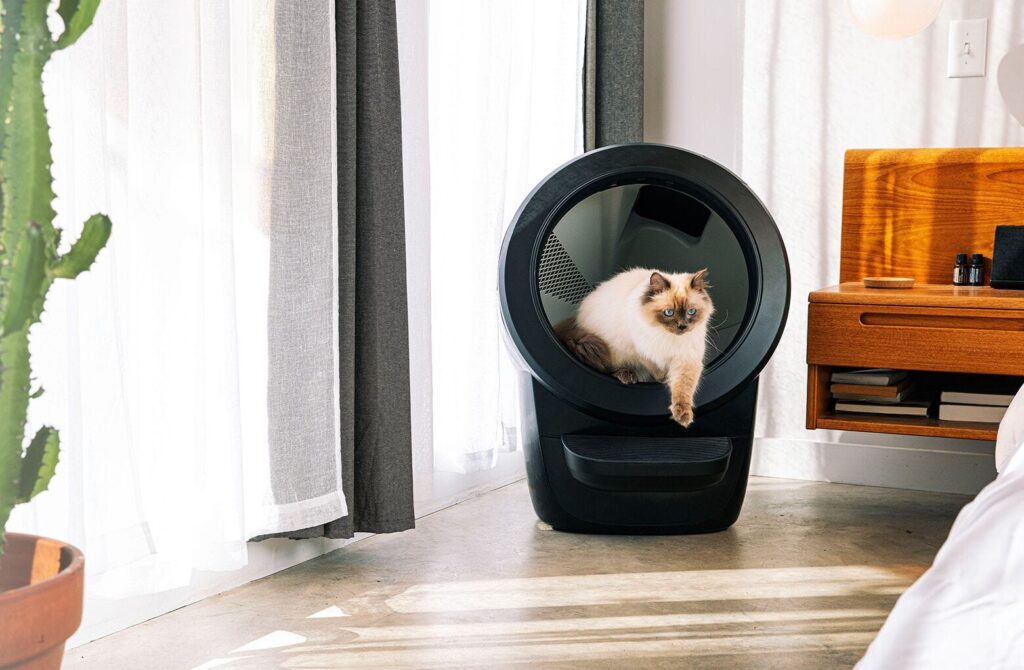
If you are a cat lover, you probably know the hassle of scooping the litter box every day. Not only is it a tedious and smelly task, but it can also expose you to harmful bacteria and dust. What if there was a way to make your life easier and your cat happier with a litter box that cleans itself automatically?
That’s what the Litter-Robot 4 promises to do. It is an automatic, self-cleaning litter box that has a larger entryway, additional sensors, and an improved app interface compared to the previous model. Also, it is quiet, attractive, easy to use and clean and it works with most clumping litter, except for strictly absorbent, non-clumping, or loose-clumping ones. In addition, it is a high-performing, cat-friendly, and innovative product that is worth the almost $650 price tag.
In this article, we will show you how to transition your cat to the Litter-Robot 4 in four simple steps. We will also explain the benefits of using this smart device and how to troubleshoot or contact customer support if needed.
Step 1: Choose a suitable location and litter type for the Litter-Robot 4
Before you introduce your cat to the Litter-Robot 4, you need to choose a suitable location and litter type for it. Here are some tips to follow:
- Place the Litter-Robot 4 in the same location as the current litter box (at least during transition). This will help your cat associate the new device with their old routine.
- Make sure the unit is on a firm, level surface. Avoid soft, uneven, or unstable flooring, which may affect the ability of the unit to detect your cat. If using litter mats or rugs, place them in front of, or completely under, the unit. Do not place mats partially under the unit. Use only low pile (1/4 inch) rugs and mats under the unit.
- Keep the unit indoors in a cool, dry location. Reduce exposure to high temperature and humidity. If possible, keep out of direct sunlight.
- Place the unit near a power outlet. Ensure the unit isn’t pushed against a wall or into a corner (must not be touching any walls for accurate weight measurements).
- Use a clumping litter that is compatible with the Litter-Robot 4. We recommend a high-quality, clay-clumping litter. Litter beads and crystals that are small enough to pass through the screen will also work (periodic changing of this type of litter is required). Do not use litters that are strictly absorbent, non-clumping, loose-clumping, newspaper-based, or wood-based pellets.
- Fill the Globe through the circular opening with the clumping litter until it meets the raised MAX Fill Line when spread flat—approximately 8-10 pounds (3.6-4.5 kg) by weight or 1 gallon (4L) by volume. Be careful not to overfill the Globe.
Safety Instructions and Importance:
| Safety Instructions | Importance |
|---|---|
| Always be sure any cat or kitten in your household that might use the Litter-Robot weighs at least 3 pounds. Cats must weigh 3 pounds or more to safely use the Litter-Robot in Automatic Mode. | To ensure that the Cat Sensor can detect your cat and prevent accidents |
| Always unplug the unit before servicing. | To avoid electric shocks or damage to the unit |
| Never force your cat into the Litter-Robot. | To respect your cat’s comfort and preference |
| Never put anything in the unit other than clumping litter or litter beads and crystals that are small enough to pass through the screen. | To avoid clogging or damaging the sifting system |
| Never sit on or place anything on top of the Litter-Robot. | To prevent injury or damage to the unit |
| Never wet or submerge the Bonnet or Base. | To protect the electronic components from water damage |
| Never allow children and persons with reduced physical, sensory, or mental capabilities or lack of experience and knowledge to use, clean, or maintain the Litter-Robot without supervision, instruction concerning its use in a safe way, and understanding of the hazards involved. | To prevent injury or misuse of the unit |
| Never allow children or others to play with the Litter-Robot. | To prevent injury or damage to the unit |
| Never use an external power supply other than the one provided with the unit. | To ensure the compatibility and safety of the unit |
| Never modify the Litter-Robot hardware. Doing so could impact important safety features and will void your warranty. | To preserve the functionality and warranty of the unit |
Step 2: Turn off the Litter-Robot 4 and leave it next to the old litter box
Your Litter-Robot 4 comes fully assembled and ready to use. However, we recommend powering the unit off until your cat(s) become familiar with and begin using the Litter-Robot. Here are some ways to facilitate the transition:
- Turn off the Litter-Robot 4 by pressing the Power button for 3 seconds. The Light Bar will flash white, then the unit will perform a Clean cycle with a sequential round-robin yellow Light Bar indicating the direction of rotation.
- Leave the old litter box near the Litter-Robot 4 for a day or two to let your cat(s) explore the new device. If your cat(s) show no interest, entice them to approach the Litter-Robot 4 by using some catnip or a favorite treat.
- Add a scoop of litter from the old litter box to provide a familiar scent for your cat.
- Place treats on the step or handle around the Litter-Robot 4 so your cat associates rewards with the unit.
Step 3: Turn on the Litter-Robot 4 after your cat has used it at least once
Once you notice that your cat(s) have used the Litter-Robot 4, power the unit on to cycle the unit. Encourage your cat(s) to be present, so they can observe the motion and become familiar with the sound of the Litter-Robot while you are there to reassure them. Turn off the unit again once the cycle is complete (the Litter-Robot should be in the Home position). We recommend that you no longer clean the old litter box once your cat(s) have used the Litter-Robot.
To turn on the Litter-Robot 4, press the Power button. The Light Bar will flash white, then the unit will perform a Clean cycle that will last 2 minutes.
To turn off the Litter-Robot 4, press and hold the Power button for 3 seconds. The Light Bar will flash white, then turn off.
Step 4: Remove the old litter box once your cat is consistently using the Litter-Robot 4
Once your cat(s) are consistently using the Litter-Robot 4, you can turn the unit on and leave it on to operate in Automatic Mode—and remove the old litter box. Congratulations, you have successfully introduced your cat(s) to the Litter-Robot!
Reward your cat(s) with more treats, play sessions, and cuddles for their successful transition. Check the litter level and empty the waste drawer regularly, and press the reset button after doing so.
To check the litter level, look at the raised MAX Fill Line inside the Globe when it is in the Home position. Add just enough litter to meet this line, and be careful not to overfill it to avoid wasting litter.
To empty the waste drawer, pull out the drawer, gather the edges of the liner bag, and dispose. You can use Litter-Robot custom-fit Waste Drawer Liners or any 10-13-gallon (37-49L) trash bags. To install a new Waste Drawer Liner, open the bag and wrap the opening over the perimeter of the Waste Drawer flange. Push the remainder of the bag into the bottom of the Waste Drawer. Slide the drawer back in, being careful not to push the unit against the wall or into a corner (should not be touching any walls for accurate weight measurements). Then, press the Reset button to zero the Weight Sensors.
To press the Reset button, press it firmly and quickly, then watch for the blue Light Bar to flash to confirm you have zeroed the Weight Scale. Be careful not to rest on the unit as you press the button or your weight will influence the reading.
Conclusion: Summarize
The Litter-Robot 4 is a smart and self-cleaning litter box that can benefit both cats and their owners. It eliminates the hassle of scooping, reduces odor and dust, and monitors your cat’s health and behavior through an app. It is easy to transition your cat to it in four simple steps:
- Choose a suitable location and litter type for the Litter-Robot 4.
- Turn off the Litter-Robot 4 and leave it next to the old litter box.
- Turn on the Litter-Robot 4 after your cat has used it at least once.
- Remove the old litter box once your cat is consistently using the Litter-Robot 4.